Last reviewed: October 2026. Applies to the Wazuh 4.14.x File Integrity Monitoring (FIM) and VirusTotal configuration documented in October 2026. A legacy dashboard image is included below, but the Wazuh version is not identified and lab logs are not preserved. The steps below have been checked against current Wazuh documentation; they have not been rerun in a Wazuh lab.
FIM notices changes in a selected directory. Wazuh can pass a file hash from a FIM alert to VirusTotal for a lookup. A hash lookup is neither a live scan of the endpoint nor automatic removal of a suspicious file.
Before you configure it
- A Wazuh manager and connected Linux agent, with permission to change their configuration and restart services.
- A VirusTotal API key whose terms and request limits fit your use. Keep the key out of screenshots and public repositories.
- A small directory on the agent that is safe to monitor. The example below uses
/var/tmp/wazuh-fim-lab; create it before enabling monitoring.
Consider the privacy of the monitored data: a hash of a changed file is sent to VirusTotal. A public VirusTotal key also has usage restrictions and rate limits. Review Wazuh’s VirusTotal integration guide and your VirusTotal account terms before using this in production.
Configure the manager integration
On the manager, edit /var/ossec/etc/ossec.conf. Add this block inside the existing <ossec_config> element. Replace the placeholder locally; never publish the real key.
<integration>
  <name>virustotal</name>
  <api_key>YOUR_VIRUSTOTAL_API_KEY</api_key>
  <group>syscheck</group>
  <alert_format>json</alert_format>
</integration>
The syscheck group limits this integration to FIM alerts. Restart the manager after saving the configuration:
sudo systemctl restart wazuh-manager
sudo systemctl status wazuh-manager --no-pager
If the service fails, restore the previous config and inspect /var/ossec/logs/ossec.log before continuing.
Monitor a small agent directory
On the Linux agent, create the directory and add this entry to the existing <syscheck> section of /var/ossec/etc/ossec.conf:
sudo mkdir -p /var/tmp/wazuh-fim-lab<directories check_all="yes" realtime="yes">/var/tmp/wazuh-fim-lab</directories>Do not add a second top-level <syscheck> block if the file already has one. Restart and check the agent:
sudo systemctl restart wazuh-agent
sudo systemctl status wazuh-agent --no-pager
Realtime monitoring is meant to send change events promptly; it does not mean every endpoint file is continuously rescanned by VirusTotal. Wazuh’s FIM settings reference covers scan and directory options.
Verify in two stages
- Create a harmless text file in the monitored directory:
printf 'fim-check\n' | sudo tee /var/tmp/wazuh-fim-lab/check.txt. Confirm a file-addition event appears in the Wazuh FIM view or manager alerts. A VirusTotal response may say the hash is unknown; that still shows the lookup path was reached. - For a known antivirus test hash, use the official EICAR test file only in an authorized lab. It contains no malware code, but local security software may block or quarantine it. Follow Wazuh’s own test procedure and clean up the fixture afterward. Do not download real malware to validate this integration.
On the manager, inspect /var/ossec/logs/integrations.log for integration activity and /var/ossec/logs/alerts/alerts.log for resulting alerts. Wazuh documents separate outcomes for invalid credentials, rate limits, hashes with no record, no positives and detections. Do not treat “no record” or “no positives” as proof that a file is safe.
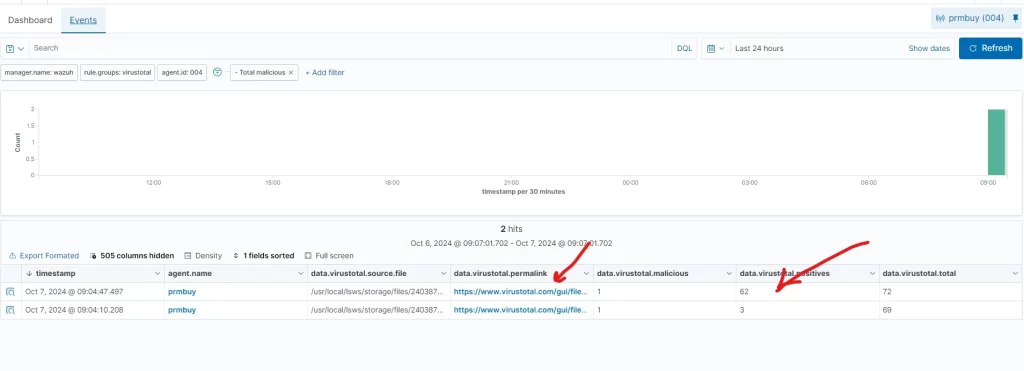
Legacy screenshot. Its version and test environment were not recorded, so use your own alerts to verify the current setup.
Failure and rollback notes
- No FIM event: check the agent connection, monitored path, file permissions and agent log. Confirm the directory existed before the test.
- FIM event but no integration result: check the manager integration block,
syscheckgroup, manager log and API key. - Rate-limit error: narrow the monitored scope or alert filter and use an API arrangement appropriate for the workload; do not increase requests by creating extra accounts.
- Rollback: remove only the integration and directory entries added for this lab, then restart the affected Wazuh services. Remove the lab fixture after reviewing its alerts.